【JavaScript】超シンプルなTODOアプリを作ってハンズオン形式で解説してみた
takahide
初心者がITを楽しむブログ
おはようございます。タカヒデです。
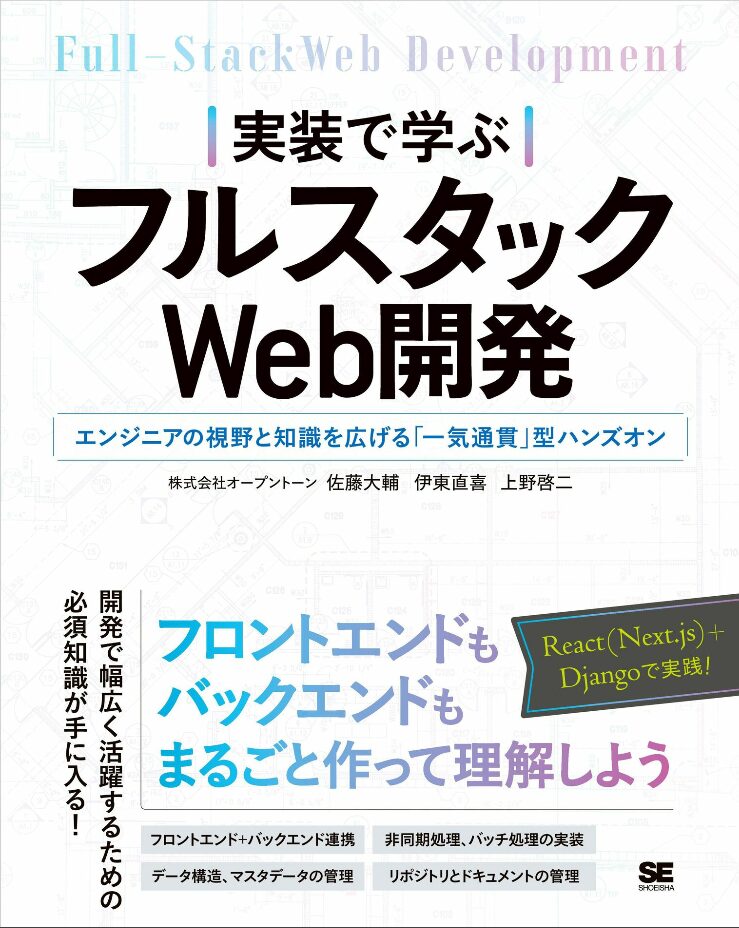
本日は技術書【実装で学ぶフルスタックweb開発】において、第5章で発生する「params」のエラーを解消していきます。
ちなみに技術書はコレ↓
では早速見ていきましょう。
このエラーは「第5章 フロントエンドの開発」において、React(Next.js)側で発生するものです。
具体的には「frontend>app>inventory>products>[id]>page.tsx」のファイルで発生します。
第5章終了時点での公開されているサンプルコードは以下の通りです。
'use client'

import {
    Alert,
    AlertColor,
    Box,
    Button,
    Paper,
    Snackbar,
    Table,
    TableBody,
    TableCell,
    TableContainer,
    TableHead,
    TableRow,
    TextField,
    Typography,
} from "@mui/material";
import { useForm } from "react-hook-form";
import { useState, useEffect } from 'react';
import productsData from "../sample/dummy_products.json";
import inventoriesData from "../sample/dummy_inventories.json";

type ProductData = {
    id: number;
    name: string;
    price: number;
    description: string;
};

type FormData = {
    id: number;
    quantity: number;
};

type InventoryData = {
    id: number;
    type: string;
    date: string;
    unit: number;
    quantity: number;
    price: number;
    inventory: number;
};

export default function Page({ params }: {
    params: { id: number },
}) {

    const {
        register,
        handleSubmit,
        formState: { errors },
    } = useForm();

    // 読込データを保持
    const [product, setProduct] = useState<ProductData>({ id: 0, name: "", price: 0,  description: ""});
    const [data, setData] = useState<Array<InventoryData>>([]);
    // submit時のactionを分岐させる
    const [action, setAction] = useState<string>("");
    const [open, setOpen] = useState(false);
    const [severity, setSeverity] = useState<AlertColor>('success');
    const [message, setMessage] = useState('');
    const result = (severity: AlertColor, message: string) => {
        setOpen(true);
        setSeverity(severity);
        setMessage(message);
    };

    const handleClose = (event: any, reason: any) => {
        setOpen(false);
    };
    useEffect(() => {
        const selectedProduct: ProductData = productsData.find(v => v.id == params.id) ?? {
            id: 0,
            name: "",
            price: 0,
            description: "",
          };
        setProduct(selectedProduct);
        setData(inventoriesData);
    }, [open])

    const onSubmit = (event: any): void => {
        const data: FormData = {
            id: Number(params.id),
            quantity: Number(event.quantity),
        };

        // actionによってHTTPメソッドと使用するパラメーターを切り替える
        if (action === "purchase") {
            handlePurchase(data);
        } else if (action === "sell") {
            if (data.id === null) {
                return;
            }
        handleSell(data);
        }
    };

    // 仕入れ・卸し処理
    const handlePurchase = (data: FormData) => {
        result('success', '商品を仕入れました')
    };

    const handleSell = (data: FormData) => {
        result('success', '商品を卸しました')
    };

    return (
        <>
            <Snackbar open={open} autoHideDuration={3000} onClose={handleClose}>
                <Alert severity={severity}>{message}</Alert>
            </Snackbar>
            <Typography variant="h5">商品在庫管理</Typography>
            <Typography variant="h6">在庫処理</Typography>
            <Box component="form" onSubmit={handleSubmit(onSubmit)}>
                <Box>
                    <TextField
                        disabled
                        fullWidth
                        id="name"
                        label="商品名"
                        variant="filled"
                        value={product.name}
                    />
                </Box>
                <Box>
                    <TextField
                        type="number"
                        id="quantity"
                        variant="filled"
                        label="数量"
                        {...register("quantity", {
                            required: "必須入力です。",
                            min: {
                                value: 1,
                                message: "1から99999999の数値を入力してください",
                            },
                            max: {
                                value: 99999999,
                                message: "1から99999999の数値を入力してください",
                            },
                        })}
                        error={Boolean(errors.quantity)}
                        helperText={errors.quantity?.message?.toString() || ""}
                    />
                </Box>
                <Button
                    variant="contained"
                    type="submit"
                    onClick={() => setAction("purchase")}
                >
                    商品を仕入れる
                </Button>
                <Button
                    variant="contained"
                    type="submit"
                    onClick={() => setAction("sell")}
                >
                    商品を卸す
                </Button>
            </Box>
            <Typography variant="h6">在庫履歴</Typography>
            <TableContainer component={Paper}>
                <Table>
                    <TableHead>
                        <TableRow>
                            <TableCell>処理種別</TableCell>
                            <TableCell>処理日時</TableCell>
                            <TableCell>単価</TableCell>
                            <TableCell>数量</TableCell>
                            <TableCell>価格</TableCell>
                            <TableCell>在庫数</TableCell>
                        </TableRow>
                    </TableHead>
                    <TableBody>
                        {data.map((data: InventoryData) => (
                            <TableRow key={data.id}>
                                <TableCell>{data.type}</TableCell>
                                <TableCell>{data.date}</TableCell>
                                <TableCell>{data.unit}</TableCell>
                                <TableCell>{data.quantity}</TableCell>
                                <TableCell>{data.price}</TableCell>
                                <TableCell>{data.inventory}</TableCell>
                            </TableRow>
                        ))}
                    </TableBody>
                </Table>
            </TableContainer>
        </>
    )
}この状態で「商品在庫管理」のページを開くと以下のように表示されるはずです。
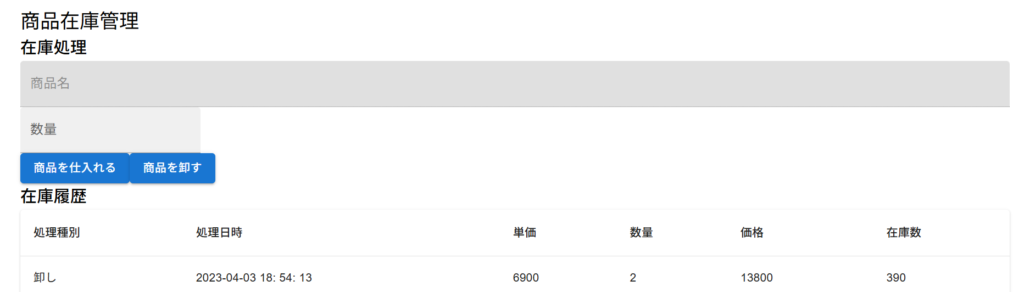
商品名の部分に「実際の商品名が入っていない」ことが分かります。
この時に発生しているエラーは以下のとおりです。
A param property was accessed directly with `params.id`. `params` is a Promise and must be unwrapped with `React.use()` before accessing its properties. Learn more: https://nextjs.org/docs/messages/sync-dynamic-apis
app/inventory/products/[id]/page.tsx (74:84) @ PagePage.useEffect


  72 |     };
  73 |     useEffect(() => {
> 74 |         const selectedProduct: ProductData = productsData.find(v => v.id == params.id) ?? {
     |                                                                                    ^
  75 |             id: 0,
  76 |             name: "",
77 | price: 0,もろもろ調べてみると、このエラーは、URLから受け取った「idの取り出し方」が間違っているときに発生するようです。
具体的には、「use client」がついているファイルでは「params」をそのまま使うのではなく、「useParams()」もしくは「React.use(params)」を使う必要があるとのこと。
このコードを修正していきます。
上記のエラーがでるコードを修正したものがこちらです。
'use client'

import {
    Alert,
    AlertColor,
    Box,
    Button,
    Paper,
    Snackbar,
    Table,
    TableBody,
    TableCell,
    TableContainer,
    TableHead,
    TableRow,
    TextField,
    Typography,
} from "@mui/material";
import { useForm } from "react-hook-form";
import { useState, useEffect } from 'react';
import productsData from "../sample/dummy_products.json";
import inventoriesData from "../sample/dummy_inventories.json";
import { useParams } from "next/navigation";

type ProductData = {
    id: number;
    name: string;
    price: number;
    description: string;
};

type FormData = {
    id: number;
    quantity: number;
};

type InventoryData = {
    id: number;
    type: string;
    date: string;
    unit: number;
    quantity: number;
    price: number;
    inventory: number;
};

// export default function Page({ params }: {
//     params: { id: number },
// }) {
export default function Page() {

    const params = useParams<{ id: string }>();
    const productId = Number(params.id);

    const {
        register,
        handleSubmit,
        formState: { errors },
    } = useForm();

    // 読込データを保持
    const [product, setProduct] = useState<ProductData>({ id: 0, name: "", price: 0,  description: ""});
    const [data, setData] = useState<Array<InventoryData>>([]);
    // submit時のactionを分岐させる
    const [action, setAction] = useState<string>("");
    const [open, setOpen] = useState(false);
    const [severity, setSeverity] = useState<AlertColor>('success');
    const [message, setMessage] = useState('');
    const result = (severity: AlertColor, message: string) => {
        setOpen(true);
        setSeverity(severity);
        setMessage(message);
    };

    const handleClose = (event: any, reason: any) => {
        setOpen(false);
    };
    useEffect(() => {
//        const selectedProduct: ProductData = productsData.find(v => v.id == params.id) ?? {
        const selectedProduct: ProductData = productsData.find(v => v.id === productId) ?? {
            id: 0,
            name: "",
            price: 0,
            description: "",
          };
        setProduct(selectedProduct);
        setData(inventoriesData);
    }, [open])

    const onSubmit = (event: any): void => {
        const data: FormData = {
            //id: productId,
            id: Number(params.id),
            quantity: Number(event.quantity),
        };

        // actionによってHTTPメソッドと使用するパラメーターを切り替える
        if (action === "purchase") {
            handlePurchase(data);
        } else if (action === "sell") {
            if (data.id === null) {
                return;
            }
        handleSell(data);
        }
    };

    // 仕入れ・卸し処理
    const handlePurchase = (data: FormData) => {
        result('success', '商品を仕入れました')
    };

    const handleSell = (data: FormData) => {
        result('success', '商品を卸しました')
    };

    return (
        <>
            <Snackbar open={open} autoHideDuration={3000} onClose={handleClose}>
                <Alert severity={severity}>{message}</Alert>
            </Snackbar>
            <Typography variant="h5">商品在庫管理</Typography>
            <Typography variant="h6">在庫処理</Typography>
            <Box component="form" onSubmit={handleSubmit(onSubmit)}>
                <Box>
                    <TextField
                        disabled
                        fullWidth
                        id="name"
                        label="商品名"
                        variant="filled"
                        value={product.name}
                    />
                </Box>
                <Box>
                    <TextField
                        type="number"
                        id="quantity"
                        variant="filled"
                        label="数量"
                        {...register("quantity", {
                            required: "必須入力です。",
                            min: {
                                value: 1,
                                message: "1から99999999の数値を入力してください",
                            },
                            max: {
                                value: 99999999,
                                message: "1から99999999の数値を入力してください",
                            },
                        })}
                        error={Boolean(errors.quantity)}
                        helperText={errors.quantity?.message?.toString() || ""}
                    />
                </Box>
                <Button
                    variant="contained"
                    type="submit"
                    onClick={() => setAction("purchase")}
                >
                    商品を仕入れる
                </Button>
                <Button
                    variant="contained"
                    type="submit"
                    onClick={() => setAction("sell")}
                >
                    商品を卸す
                </Button>
            </Box>
            <Typography variant="h6">在庫履歴</Typography>
            <TableContainer component={Paper}>
                <Table>
                    <TableHead>
                        <TableRow>
                            <TableCell>処理種別</TableCell>
                            <TableCell>処理日時</TableCell>
                            <TableCell>単価</TableCell>
                            <TableCell>数量</TableCell>
                            <TableCell>価格</TableCell>
                            <TableCell>在庫数</TableCell>
                        </TableRow>
                    </TableHead>
                    <TableBody>
                        {data.map((data: InventoryData) => (
                            <TableRow key={data.id}>
                                <TableCell>{data.type}</TableCell>
                                <TableCell>{data.date}</TableCell>
                                <TableCell>{data.unit}</TableCell>
                                <TableCell>{data.quantity}</TableCell>
                                <TableCell>{data.price}</TableCell>
                                <TableCell>{data.inventory}</TableCell>
                            </TableRow>
                        ))}
                    </TableBody>
                </Table>
            </TableContainer>
        </>
    )
}全体を見てもよくわかりませんね。
細かく修正したところを見ていきましょう。
import { useParams } from "next/navigation";// export default function Page({ params }: {
// params: { id: number },
// }) {
export default function Page() {
const params = useParams<{ id: string }>();
const productId = Number(params.id); useEffect(() => {
//const selectedProduct: ProductData = productsData.find(v => v.id == params.id) ?? {
const selectedProduct: ProductData = productsData.find(v => v.id === productId) ?? {
id: 0,
name: "",
price: 0,
description: "",
};
setProduct(selectedProduct);
setData(inventoriesData);
}, [open]) const onSubmit = (event: any): void => {
const data: FormData = {
//id: productId,
id: Number(params.id),
quantity: Number(event.quantity),
};修正したのはこの4か所です。
ではあたらめて実行し、商品在庫管理画面を見てみましょう。
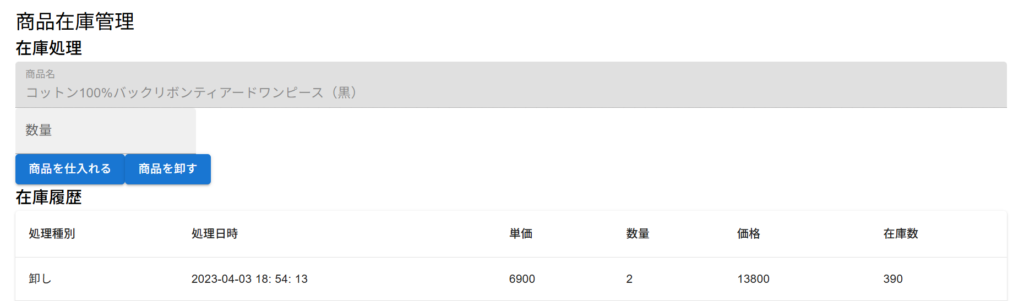
商品名のところに、実際の商品が記載されていることが分かります。
第6章以降でもこのエラーは続いてしまうので修正しておきましょう。
【実装で学ぶフルスタックweb開発】で学習している方の参考になれば幸いです。
お疲れさまでした。